Java Switch Statement
Java Switch Statement
Points to Remember
- There can be one or N number of case values for a switch expression.
- The case value must be of switch expression type only. The case value must be literal or constant. It doesn't allow variables.
- The case values must be unique. In case of duplicate value, it renders compile-time error.
- The Java switch expression must be of byte, short, int, long (with its Wrapper type), enums and string.
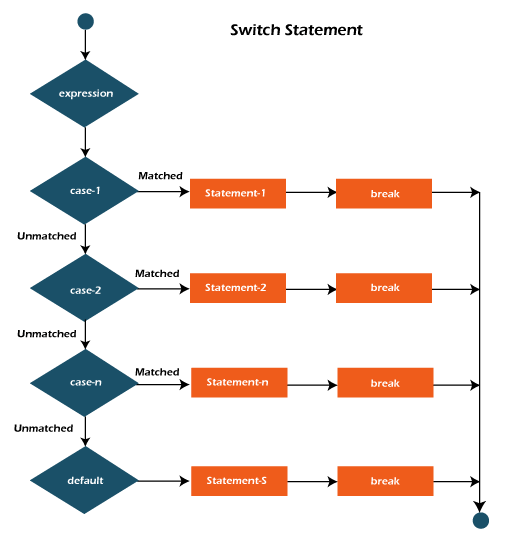
- Each case statement can have a break statement which is optional. When control reaches to the break statement, it jumps the control after the switch expression. If a break statement is not found, it executes the next case.
- The case value can have a default label which is optional.
Syntax:
switch(expression){
casevalue1:
//code to be executed;
break; //optional
casevalue2:
//code to be executed;
break; //optional
.......
default;
code to be executed if all cases are not matched;
}
Example:
SwitchExample.java
public classSwitchExample {
public static voidmain(String[] args) {
//Declaring a variable for switch expression
intnumber=20;
//Switch expression
switch(number){
//Case statements
case10: System.out.println("10")
break;
case20: System.out.println("20");
break;
case30: System.out.println("30");
break;
//Default case statement
default:System.out.println("Not in 10, 20 or 30");
}
}
}
Output:
20
Java Wrapper in Switch Statement
Java allows us to use four wrapper classes: Byte, Short, Integer and Long in switch statement.
Example:
WrapperInSwitchCaseExample.java
//Java Program to demonstrate the use of Wrapper class
//in switch statement
public class WrapperInSwitchCaseExample {
public static voidmain(String args[])
{
Integer age = 18;
switch(age)
{
case(16):
System.out.println("You are under 18.");
break;
case(18):
System.out.println("You are eligible for vote.");
break;
case
(65):System.out.println("You are senior citizen.");
break;
default:
System.out.println("Please give the valid age.");
break;
}
}
}
Output:
You are eligible for vote.